

I’m here simply to advocate for Linux support. I have 3 Razer devices, headphones, keyboard and mouse and they struggle to work with Linux. Us Linux users should not have to settle for third part software like OpenRazer. While I respect their work it should not be on them to have to make these tools. We paid money for our devices, we expect support on Linux.
- Home
- Community Overview
- Razer Synapse
- Razer Synapse 4
- Synapse 4 on Linux!
Synapse 4 on Linux!
- June 15, 2025
- 147 replies
- 42268 views
147 Replies

- Insider Mini
- February 22, 2026
You know, now I'm thinking it doesn't matter since Synapse 4 doesn't even work anyway. My sensitivity clutch takes 30 seconds to activate and then to deactivate when I press it for five seconds. So it's pointless to even have this stupid thing now.
- Insider Mini
- March 6, 2026
I recently bought some stuf (blackwidow v4 lowprofile hyperspeed, cobra hyperspeed, kraken v4 hyperspeed and leviathan v2).
Then after real windows issues not related to razer, i moved to linux.
But on linux, no light control, no battery level, ……… just basic functionnalities without synapse v4 support.
Please hear our voices.
- Insider Mini
- March 13, 2026
Joining the chorus of pleas here. I dumped Windows for Linux last year. THE ONLY THING I’m having trouble with is rebinding the side button on my Razer Naga. Synapse doesn’t run on Linux. The only solution I have found is to find a Windows computer JUST TO REBIND MY KEYS.
I have owned so many Razer mice. For over a decade. This is forcing me to find a mouse that will actually work in Linux.
How hard can it be to just give us the same thing you give Mac users?

- Insider Mini
- March 18, 2026
Made an account just now for the sole purpose of bumping and replying to this thread, I was gonna very happily buy a basilisk V3 pro 35k with my money but if all that cash isn't letting me use the software which is apparently so important then I'm not gonna get it. Last thing I do is wanna use windows, don't want the bloatware, ai slop, lag, or support microslop, I know that razer very much likes money and not supporting Linux is very much costing you money, time ticks by and that's all lost revenue both to people deciding to not start to use razer, or switching from it and not looking back. To anyone reading this, remember to vote on products with your money. If it doesn't respect the consumer then it isnt worth your money :P

- Insider
- March 20, 2026
Linux user here - I agree wholeheartedly that Razer should offer native Linux support. I use Linux as a secondary daily driver when Windows isn’t an option. We need to be able to use our stuff on our Linux machines without inferior third-party tools.
- Insider Mini
- March 22, 2026
How has this not already happened? 😅
Came here to throw in my voice to the chorus.
Razer - do something ^^

- Insider Mini
- March 31, 2026
I’m moving over to Linux now and it’s sad to see no native support.

- Insider Mini
- April 2, 2026
You could support linux by making your own flatpak or appimage or better yet support all the destros by making .deb .rpm etc….
Driver support can be done by contributing to the kernel.
Synapse 4 App and kernel is all you need. You have open drivers already you just need to go all in on hiring a maintainer to push it to the full kernel instead of those packaged drivers.
- Insider Mini
- April 3, 2026
Fully supporting this. Switched from Windows to Linux a couple of months ago and struggling with getting everything to work.
Yes, openrazer does some things but does not support all devices and does not support all features, plus it might take a while (I even had to contribute code to get my keyboard supported).
So, like many others here are asking, please support this officially so I can continue using my (quite expensive) keyboard easily
- Insider Mini
- April 5, 2026
It’s unacceptable that in 2026 we have gaming focused super stable distros and no way to properly use our gaming mouse and keyboards in these …. I like both my V3 Pro SE and my viper ultimate, but my next mouse it’s not going to be razer, unless it has full linux support.

- Insider Mini
- April 6, 2026
While a combination of openrazer, polychromatic, razer-CLI and Steam launch commands to set my mouse sensitivity per game I’m able to get most of the functionality of Synapse. That said, we shouldn’t have to jump through to many hoops to use Razer devices on Linux. Please bring Synapse to Linux as well as provide the ability to update firmware for peripherals on Linux to show the gaming community you truly care.
The Steam Machine is coming, many of us are already gaming on Linux. The writing is on the wall - lay down the gauntlet and show up all the other peripheral manufacturers by being the first to offer first-party support on Linux.
- Insider Mini
- April 12, 2026
Its time Razer step up their “game” and make their devices compatible with major Linux distributions in a world and time where even Microsoft have repositories and software available on the OS platform. Major missed opportunity there, maybe its one of the reasons why “RAZFF” was delisted in 2022. ¯\_(ツ)_/¯
- Insider Mini
- April 21, 2026
Im sure people have figured this out, but I found this way to make synapse usable through linux (well not really). This method doesnt require a secondary computer or a separate install of windows. Meaning it can be done more “on the fly”.
Anyways: Install virtualbox from ur software manager and install extensions. Restart may be required
2: Install a windows of ur choice, preferable 10 as it supports synapse 4. ISO can be downloaded from microsoft (just google). MAKE SURE YOU TICK THE “Skip unnattended installation box”, that way is faster, but it may fuck up your admin rights.
3: Update any essentials through regular windows update once its up and running.
4: next add urself to vbox usergroup. Look here: https://askubuntu.com/questions/377778/how-to-add-users-to-vboxusers-to-enable-usb-usage
5: Restart your computer
6: Go to setting in V.box then to usb. Set up a filter. If everything so far had been done correctly your usb devices should be listed here. Pick your device and save.
7: Start your virtualbox
8: Once u do that synapse should find ur device.
Now make your macro or whatever and SAVE to device memory. Some devices even have several memory slots which you can switch between on the go with a button press.
Once you’re done Shut down your Vbox, windows start menu > shut down. Depending on if u use vbox for other things make sure to unclick the Usb-hijack we did in step 6. If not, you can just leave it for the next synapse use.
- Insider Mini
- April 23, 2026
Just came here to support this. Moved to Bazzite from Windows like many others. Linux is growing, please support it
- Insider Mini
- April 25, 2026
I just learned that with Razer’s newest mouse, the Razer Viper V4 Pro, you are able to use Synapse Web Beta to configure settings in-browser! I haven’t tried it and haven’t seen anything specific to Linux, but in theory, this would completely remove the need for a Linux-specific app.
For now these are the only devices that are available, but I assume every new device should be supported from here on out.
- Insider Mini
- May 4, 2026
Bump! This is yet another request for Linux support. I need the profile switching and cloud save.
- Insider Mini
- May 8, 2026
THIS! We need Linux support nativ asap. Razer, come on, try to be the best you have ever been on the Steam Machine and other Linux Systems. The Gamers are ready, are you?
- Insider Mini
- May 11, 2026
Would love to see Synapse 4 officially supported on Linux. A lot of us use Razer gear on Linux daily, and having native support for RGB, macros, profiles, and device management would be huge. Even basic support like being able to see the battery etc. would go a long way.

- Insider Mini
- May 13, 2026
I just made this forum account to come here and advocate for this. This is so extremely important right now with the concerns surrounding Windows 11’s recall “feature” and Microsoft forcing people to upgrade to 11 from 10 and making older hardware that works fine suddenly “obsolete.”
I have recently been playing around with CachyOS and Nobara running KDE-Plasma with basically zero experience with Linux and so far I love it. There are issues I’ve run into with installing certain software or finding alternatives I like but for the most part I’m enjoying the experience. But the main issue for me personally has been the lack of keymapping support for my Tartarus V2 (and to a lesser extent my new Basilisk V3 X). I use my Tartarus for my art and animation workflow and the fact I can’t find a proper alternative to Synapse has been maddening.
Also with Steam pushing Linux support for gaming this is the right time to further that support. I’m right now having to choose between staying on Windows with all its privacy and security concerns, or simply finding an alternative to Razer that works with Linux.
I hear you there and I am planning to switch Linux and refuse to run Windows 11 with all it’s issues right now.
I too have a Tartarus V2 and depend on that greatly because I have my Tartarus V2 programed for World of Warcraft and cannot play the game without my Tartarus V2.
- Insider Mini
- May 26, 2026
Hey to all,
I just wanted to say that I totally agree.
I lately tried switching to Nobara Linux and came VERY far.
I got things to work I never expected to be able to do and I really loved the system for its look and feel.
The only thing I was struggling with was my Razer Tartarus V2 which I never want to miss again so I (for first) had to switch back to Windows. I felt like a downgrade like having sit in a sports car for getting back into a old long used well known slow heavy tank.
There are some elephants in the room making things hard for Linux:
- Microsoft office, Teams, etc.
- Adobe and Corel.
- Razer.
The first two can be dealt with via “Winboat” or a Windows-VM via e.g. VMware.
This might not work out for Bazzite!
But for Razer things get messy. You just simply can’t run it in a virtual surrounding and expect to have something going on for the host system (Linux).
The Hardware itself actually IS working on Linux thanks to Open Razer (follow ALL the installation steps with the commands you need to do carefully and do ALL of them which means also adding your user to the Razer user group etc) and with the help of the standard drivers of Linux.
BUT the rest of what we know from our Razer software is another thing.
I wasn’t able testing the use of Razer synapse in combination with proton yet but I don’t even think this would change anything or would work out at all (because of the virtualization).
But as I’m not the kind of person only sitting there and being annoyed I did some research:
- Razer is working on Razer Synapse as a web application to support more than just Windows.
Will it be as good as Razer Synapse 4?
I don’t think so but let’s hope for the best. - For the time being there are SOME possibilities for getting things to work:
- For the Lighting:
- You need Open Razer and whatever App that is making use of it like “polychromatic” or whatever.
- You can also use openRGB for connecting your Razer devices with the lighting of your PC.
- For music visualization try that out: https://github.com/devdeepray/Realtime_PyAudio_FFT_OpenRazer?tab=readme-ov-file
- For music visualization for openRGB try that out: https://github.com/CalcProgrammer1/KeyboardVisualizer
- There is NO way for using Razer Apps for game lighting or whatever yet sadly!
- For the Key Remapping:
- Try out “Input Remapper”
This is just a first help and doesn’t give you multiple layers for the Tartarus or whatever. - As written on Reddit ( https://www.reddit.com/r/linux_gaming/comments/12bc6co/razer_tartarus_v2_remap_keys_on_linux/ ) the remapping can be done via the help of scripts:
- Try out “Input Remapper”
- For the Lighting:
Preparation:
sudo systemd-hwdb update
sudo udevadm trigger
The Script:
# This file is to remap the keys on the Razor Tartarus v2
#
# Default profile
#
evdev:input:b0003v1532p022B*
#
# Top row
# KEYBOARD_KEY_7001e=
KEYBOARD_KEY_7001f=1
KEYBOARD_KEY_70020=2
KEYBOARD_KEY_70021=3
KEYBOARD_KEY_70022=4
#
# Second row
KEYBOARD_KEY_7002b=leftctrl
KEYBOARD_KEY_70014=5
KEYBOARD_KEY_7001a=6
KEYBOARD_KEY_70008=7
KEYBOARD_KEY_70015=8
#
# Third row
KEYBOARD_KEY_70039=leftshift
KEYBOARD_KEY_70004=9
KEYBOARD_KEY_70016=0
KEYBOARD_KEY_70007=minus
KEYBOARD_KEY_70009=equal
#
# Fourth row
KEYBOARD_KEY_700e1=space
# KEYBOARD_KEY_7001d=
# KEYBOARD_KEY_7001b=
# KEYBOARD_KEY_70006=
#
# Thumb button above thumbstick
# KEYBOARD_KEY_700e2=
# Thumbstick
KEYBOARD_KEY_70052=w
KEYBOARD_KEY_70051=s
KEYBOARD_KEY_70050=a
KEYBOARD_KEY_7004f=d
#
# Thumb button below thumbstick
KEYBOARD_KEY_7002c=f11
Additions:
Remove the newline character after the scancode 700e2. It appears to be a typo.
Also add
~$ echo mygamefile.hzdb | base64 -w0
as a variable at the beginning of the script and add an option in the getopts
Then add the following Script:
#!/bin/bash
set -euo pipefail
dir=$(pwd)
phasmophobia='dGhpc2lzZm9ycGhhc21vcGhvYmlhCg=='
diablo4='dGhpc2lzZGlhYmxvNA=='
declare game
while getopts ":pd" opt; do
case "${opt}" in
p)
game=${phasmophobia}
;;
d)
game=${diablo4}
;;
esac
done
write_conf(){
echo "${1}" | base64 -d > /etc/udev/hwdb.d/99-tartarus_v2.hwdb
systemd-hwdb update
udevadm trigger
}
if [ $EUID != 0 ]; then
sudo bash -x "${dir}/$0" "$@"
exit $?
fi
write_conf "${game}"
Conclusion:
There are ways to deal with Razer-software-hardware-problems BUT things are not very easy for now, you have to do al lot of work and scripting which isn’t the things we want to do.
- We want to plugin the hardware, configure it and start gaming.
- We might not want to be forced to use Windows especially not in times of SteamOS and the upcoming Steam Machine while Valve pushes Linux Gaming and kinda battles Microsoft and in times al lot of people want to finally be able to switch to Linux because they want to.
- We want not just drivers but full software support for our expensive hardware and at least the possibility of remapping our keys because if it was just about fancy looking LED lighting we could also buy cheaper hardware without the need of any software.
- We at least expect support a Flatpak version of Razer Synapse and maybe Razer Chroma. Having Remote Play via a Flatpak version of Razer Cortex would be nice too but isn’t necessary at first.
- We at least expect full support for Arch Linux (especially Steam OS and Cachy OS) and Fedora Linux (especially Bazzite and Nobara Linux). Support for Ubuntu (and so also for Linux Mint) would be great too.
So please dear people of Razer, do your best with the Razer Synapse web application and come with us into a better future for Linux gaming with a flatpak version of Razer Synapse, Razer Chroma and mybe also Razer Cortex remote play.
We are begging you please.
Or should I say “we pay you”? 😜
Thanks a lot for your great hardware and for Razer Synapse and all your software.
Thanks a lot for Open Razer and thanks for your future Linux Support (if it comes to that).
- Insider Mini
- May 27, 2026
A little addition to my last Post:
For Razer Hardware that has an internal Memory (so especially for older Hardware) that might still work with Linux, you can (as was written by someone earlier) use a Windows VM with the specific versuon of Razer Synapse on it.
Just passthrough your USB Hardware and save your confic to the device storage.
Then go back to Linux and use your configuration there.
This still is not a thing for games supporting Razer RGB and for music visualization you still will need the Github stuff I linked to.
But the key mapping might be a good thing about it.
There also still somewhere can be found “Keyboarding master” on the web. The project was last updated 2021 and isn’t maintained anymore. It was kinda a teverse engeneered Razer Synapse.
Maybe for older Hardware it still is a thing and maybe someone could update it for todays hatdware with support for Open Razer?
- Insider Mini
- June 1, 2026
Hi to all of you!
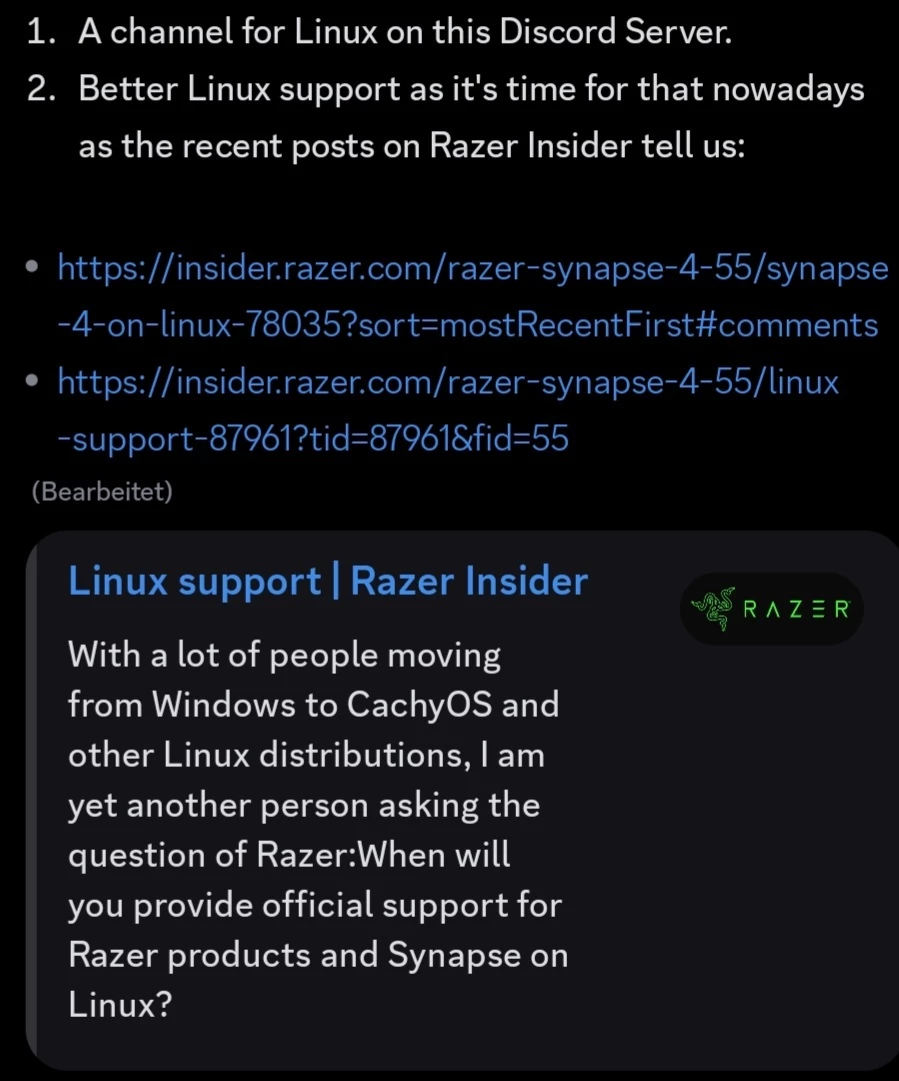
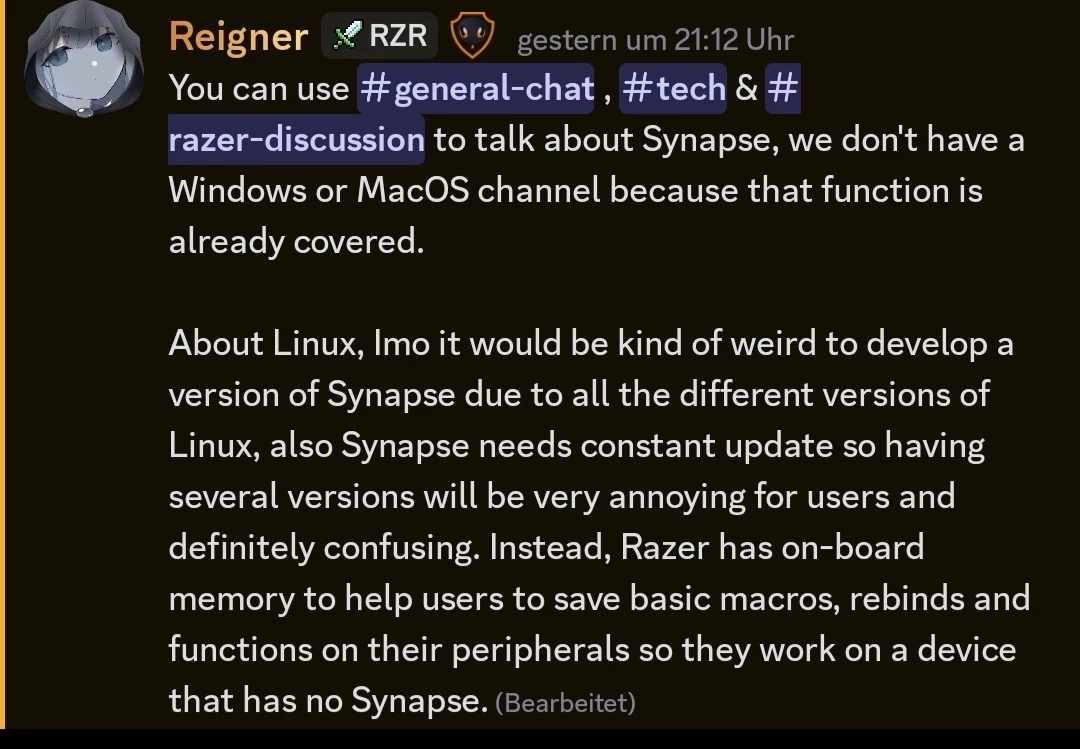
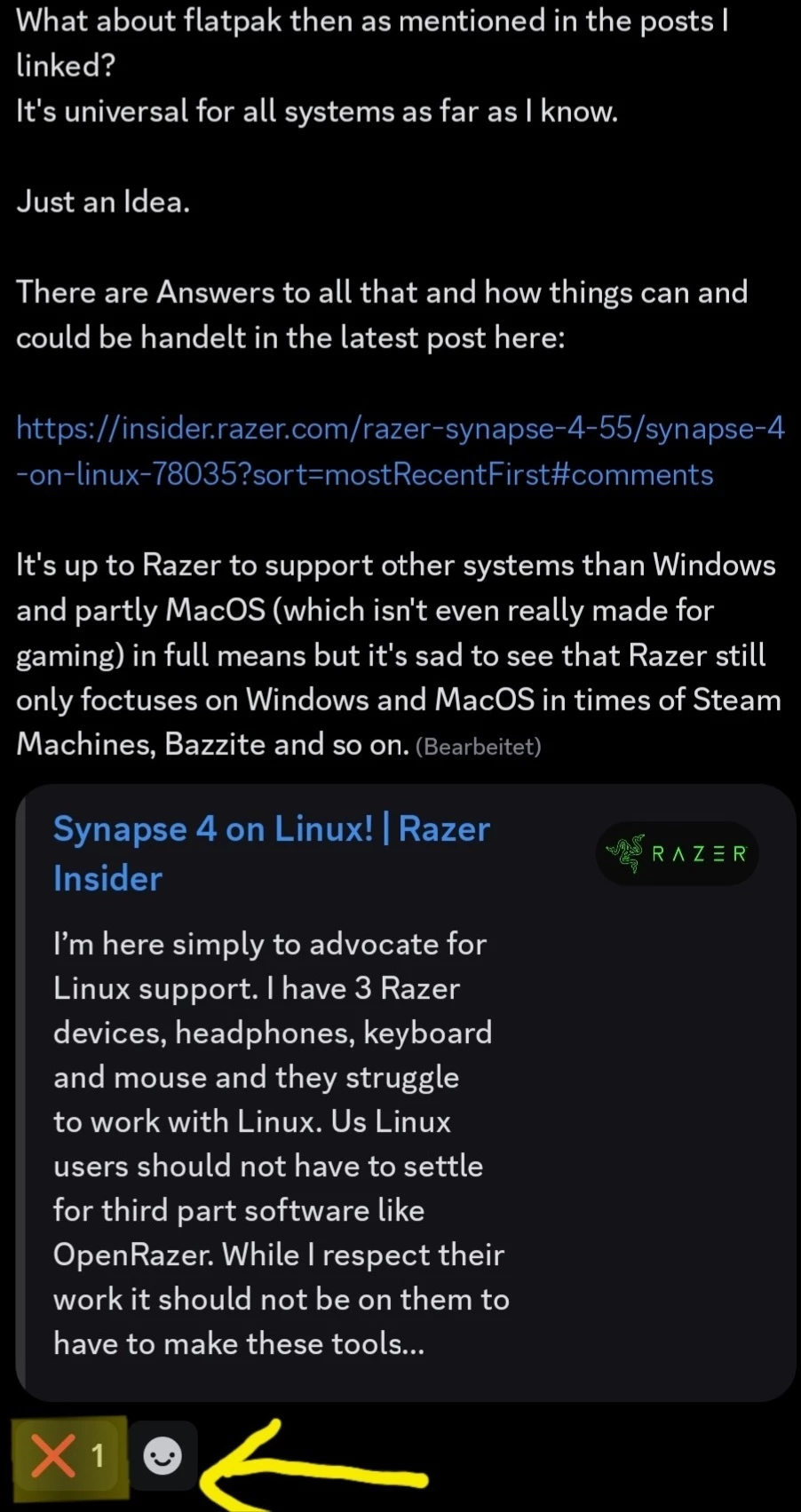
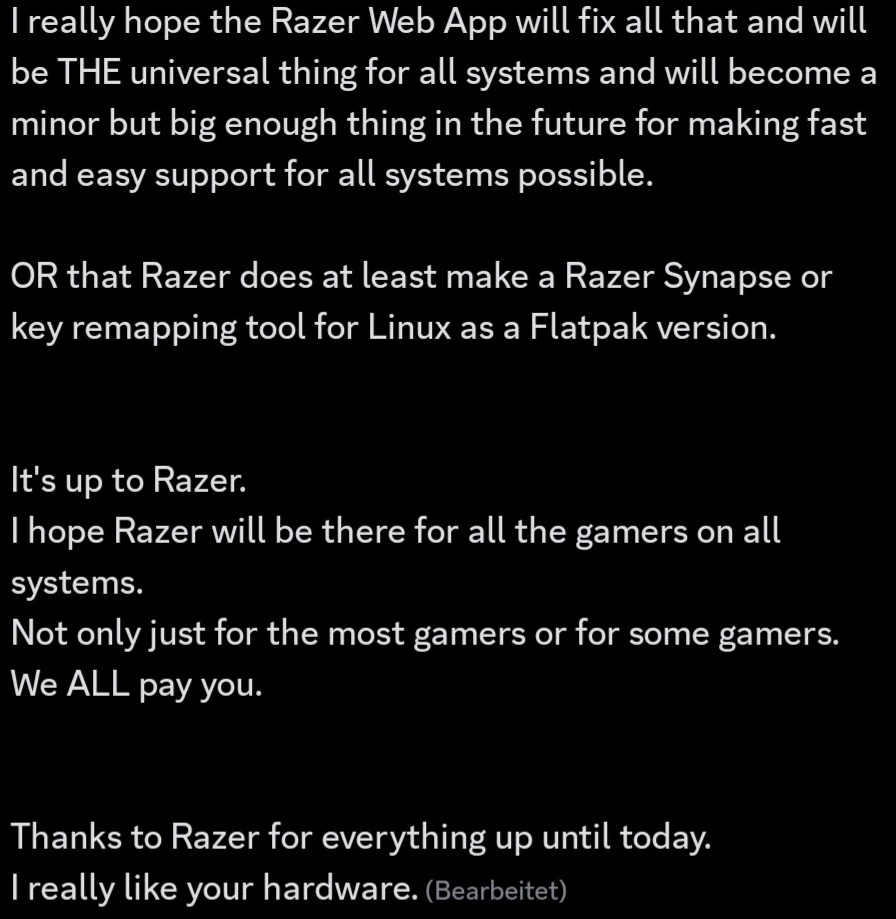
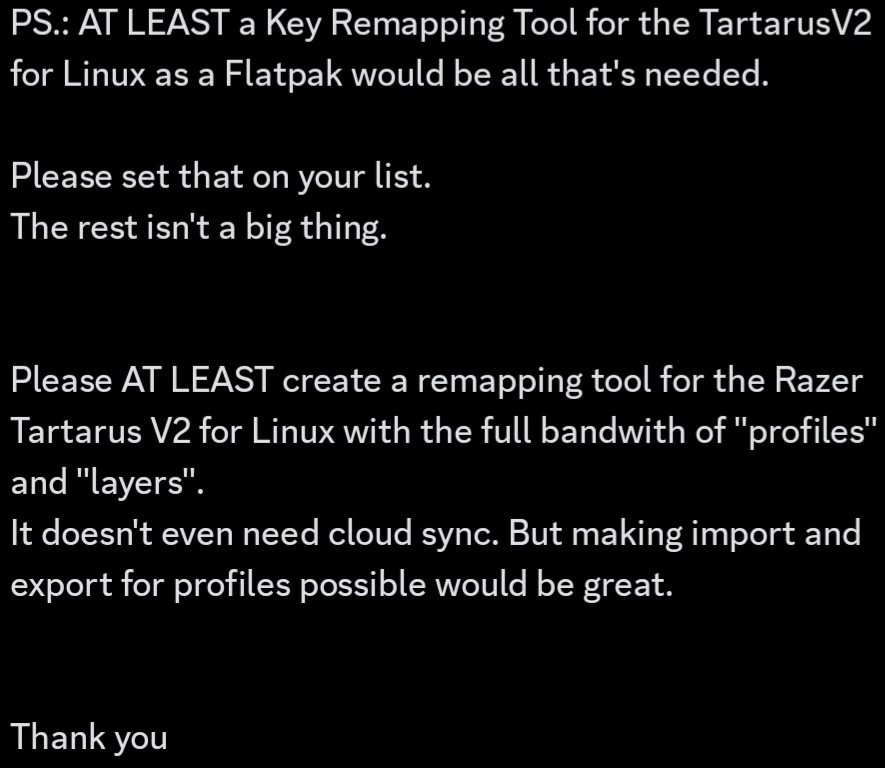
I did contact Razer on their Discord and surprisingly for the first time it seemed a moderator really cared about my posts and directly reacted on them as it seems like that topic is like a red rag to Razer. I have done some screenshots for you and the reaction was clear: Razer DEFINITELLY says NO to Linux!
They don't even think about Flatpak stuff which is kinda universal for all Linux systems in some kind of way.
You can find the Screenshots of that conversation down below at the end of this post.
So no further requests, no partitions, no whatever. Linux won't get further support but luckily at least Open Razer drivers.
If the Razer Web App will do the job to bring basic support to all systems of all kinds worldwide?
Let's hope so but I guess we shouldn't expect TOO much from it by now.
So to say it in short: Linux people have to help themselves and in the point of view of Razer can be lucky to have at least Open Razer.
So to close this all as a conclusion here are the main points again to sum things up:
1. Razer Hardware should work fine with the standard drivers of Linux. As long as it just comes to keyboards without extra buttons and kinda normal mice.
2. For making Razer hardware fully compatible with Linux get open Razer:
-> Installation instructions here: https://openrazer.github.io/#download
=> For Bazzite do type in "ujust install-openrazer" in your terminal! No guarantee that this really works out!
=> For SteamOS follow this guide: https://daniele.tech/2022/12/how-to-get-openrazer-working-easily-on-steam-deck/
-> Don't forget to to add your user to the Razer user group if needed ( sudo usermod -a -G plugdev <your username here> ).
-> Think of the fact that things might not work with activated secure boot in the bios!
3. For the lighting use either one of the community made "Razer Apps" ( https://openrazer.github.io/#apps ) or Open RGB.
4. For Music visualization try out this Github Project:
https://github.com/devdeepray/Realtime_PyAudio_FFT_OpenRazer?tab=readme-ov-file
-> For Fedora-systems you need to prepare the following:
sudo dnf install python3-numpy python3-scipy python3-matplotlib python3-pygame python3-pyaudio alsa-lib-devel portaudio-devel redhat-rpm-config
-> For Debian-systems (also Ubuntu etc.) the project tells you to prepare:
sudo apt-get install python3-numpy python3-scipy python3-matplotlib python3-pygame python3-pyaudio
libasound-dev portaudio19-dev libportaudio2 libportaudiocpp0
5. Lighting change from games supporting Razer Chroma ( https://www.razer.com/chroma-workshop#--games ) is not possible on Linux!
6. For the keymapping (especiall for your extra buttons) try out "Input Remapper"
-> Fedora-systems:
sudo dnf install input-remapper
sudo systemctl enable --now input-remapper
-> Debian-systems:
sudo apt install input-remapper
sudo systemctl enable --now input-remapper
-> Arch-systems:
yay -S input-remapper-git
sudo systemctl enable --now input-remapper
-> Universal blue systems (Bazzite and so on): It should be preinstalled as far as I know.
I saw that there was a request for the feature to toggle keymaps with the push of a button lately:
https://github.com/sezanzeb/input-remapper/issues/1301
Let's hope this feature will be added sooner or later.
You can also try coding your own scripts for key remapping as mentioned before but that is a hard job for most people.
Another method would be changing the keymapping from inside your games if possible or remapping your keys with the help of Steam if you can.
--------------
For the "special people" (like I am) that have "special hardware" like the Razer Tartarus V2:
You folks might have trouble.
You CAN try the "Input Remapper" but it nor gives you multiple layers neither the option to switch between setups with the push of a button yet!
Like I just wrote above there is a request about that ( https://github.com/sezanzeb/input-remapper/issues/1301 ) but whether that feature will be added or not nobody knows.
The lucky thing is:
Most games just need one layer and so only one setup!
BUT for WoW and games like Crimson Desert that definitelly need multiple layers (so multiple setups you switch through) there at the moment is no chance of doing so on Linux without coding stuff yourself!
For WoW classic one could say that you can get things going on a Windows VM or in the future even on Winboat too as it might even run on a Windows VM with Razer Synapse installed.
But to be honest: That's weird, kinda strange and if you really need a Tartarus V2 for WoW classic is another question.
So for the Razer Tartarus users the message is:
For now better stick with Windows or set up a PC with Linux AND Windows on it. This at the moment might be the best thing anyways. Windows is then used for the games you need your Tartarus for. There you can deal with multiple layer setups and with the anticheat games that do not work on Linux yet (and still do have cheaters anyways what makes them cheated anticheat games).
OR you simply only play games you only need one layer for and maybe can do the remapping ingame. But that obviously is kinda stupid.
--------------
For those of you who still use older hardware of the time when Razer Synapse 2.0 was up to date there still is "Keyboarding Master" available which really kinda was a Razer Synapse for Linux:
git clone https://bitbucket.org/monkygames/keyboarding-master.git
You guys might also have the possibility to configure your hardware on a Windows VM and then use it on your Linux host right away as your devices still have internal storages for Razer Profiles and RGB setups.
Newer devices of today don't have internal storage space anymore to store profiles and so on which gives us a lack of possibilities but as far as I know makes RGB sync easier and is needed for the newer Razer Chroma stuff to work correctly. At least so I guess. Am I right with that Razer?
--------------
For the people using Bazzite one last little hint:
You guys should think of the fact that your system isn't just based on Fedora but also on Universal Blue and so is using commands from Universal Blue.
Also your system is "invincible" which means that you can't change so much like in other Distros and are limited to what the system gives you (kinda like Windows but even more limited in some ways).
That means that not everything will work out for you when it comes to drivers not supported by Bazzite or to stuff like Winboat as Docker is a thing Bazzite doesn't really like and so on.
You might not have problems with Razer though but you should think of such stuff and I wanted to remind you of that fact.
Also Universal Blue is not officially supported by Open Razer as far as I know so be aware of issues!
Here the Screenshots from the conversation with the Razer moderators on Discord:


- Insider Mini
- June 17, 2026
y’know back in the day Razer were regarded as a weird outsider by most - someone who was doing things definitely outside of the ‘norm’.
so to me Linux is a perfect fit for Razer - renegades united imo.
am running a Razer Trinity with Razer OrbWeaver Chroma and a Razer Cynosa Chroma - yes all older gear now but then I am old and old skool :P
I have 4 Trinity’s, 3 Orbweavers as well as a Razer Tartarus Pro sat in it’s box (had to try it but it was sadly not fitting my hand).
used to have an original Boomslang and also a Belkin Nostromo N52 before Razer got their gifted hands on it and really bought it to life.
so yeah - have a lot of gaming in my background (UT99 4eva) and now I have made the move to Linux full time and totally committed I find it really sad to see Razer totally blanking this amazing OS.
yes open razer works as does poly-put-the-kettle-on and input remapper who wants 3 progs?
not me for sure and the weirdly the colours don’t stick on the trinity for nasal sex why.
so come on folks - you cannot tell me that in the Razer company their aren’t gamers on Linux too who also find it a total ballache not having Linux supported.
from what I can see there are a lot of people leaving Windoze cause of AI slop and data abuse.
Linux needs you <3
- Insider Mini
- June 23, 2026
Officially reply number 100 adding to the call for Linux support!
Windows is just getting shitter and shitter. We need a better option!!!
Sign up
Already have an account? Login
Log in with Razer ID to create new threads and earn badges.
LOG INWelcome to Razer Insider
No account yet? Create an account
Log in with Razer ID to create new threads and earn badges.
LOG INEnter your E-mail address. We'll send you an e-mail with instructions to reset your password.