














[MONTHLY SILVER] July 2026 30,000 Silver Drawing
-
Recently active
Hello World! Here is my fantastic pink setup!
Hello All! I have the Razer Blade Stealth (2019) and the 256GB (M.2 SATA) storage is just not enough for gaming so I want to upgrade it to 1TB. Does anyone have any advice? Any recommendations on a good, compatible SSD? Will the laptop be able to handle that much storage? This is the specific laptop in question: Razer Blade Stealth 13” (2019) | RZ09-0281x Support thanks in advance Note: originally posted this in general discussion but realised this is a better forum.
If you have the above hardware as of 2022, then you are "Crazy" and "Awesome!!!"
Voici ma station de combat totalement razer avec un peu de collection
Hello Razer Community, Hoping to get some feedback from some folks who may be willing to help and share their input on something. Specifically, I'm looking to upgrade my current system, and will be using my new NZXT H510 Compact Mid-Tower ATX Case I received from a recent giveaway! I've been planning this for a while now, and have had some input from other folks throughout. I'm just about ready to pull the proverbial trigger, so to speak, but thought I'd get some input from you folks! First and foremost, this will be used for content creation (gaming, streaming, videos, etc). I'm looking to essentially upgrade my current system, which is an HP Pavilion 500-189. Recently, I received an NZXT H510 Mid-Tower ATX Case free (minus duties) from a giveaway, and so am looking to use that. One thing that seems to come up regularly from others is the case. Many cite the fact it has poor airflow, and recommend I go for a different case - frankly, my current system, when the side is on, has very
I recently bought a Dell XPS 8940 desktop that came with: a 3060 TI, 16 gigs of 3,200 MHz ram, and an 11th gen Intel Core i7-11700. What I am thinking is if my CPU's is bottlenecking; should I upgrade it; should I get more fans and what else should I do?
I have a Dell computer a Razer Cynosa Chroma (keyboard) a Razer Golathius Chroma (mousemat) and a Razer Basilisk V3. Using Razer Studio, I set everything to Ripple and Starlight.
Hola tengo una placa Placa Asrock B550 Taichi Razer Edition, le agregue memorias RAM con RGB la KINGSTON HYPERX PREDATOR pero no sincroniza a pesar que agregue controladores de la marca KINGSTON, sin embargo el cooler RGB que llego con el procesador AMD sincroniza de lo mas bien con la placa, SI PUDIERAN AYUDARME DICIENDOME QUE TIPO DE MEMORIAS RAM SINCRONIZAN CON LOS RGB DE RAZER
I entered in for the "Tune In to Min and Win" giveaway here on Insider, and I ended up being selected! Now the Basilisk V3 can grace the rest of my Razer lineup, and I couldn't be more hyped! Shoutout to @shin1604 for helping me out!
I just got a Razer Blade 14 (Mid 2021) I want to see what my options are for upgrading the hard drive and ram in my laptop. This is my first time owning a gaming laptop so I'm not sure what to look for. Any help would be much appreciated also is it possible to put a 2.5" ssd in the laptop?
Does this case have a HDD mounting? Perhaps above the SFX powersupply?
Opposite to your cool Battlestation, what about your PC peripheral boxes? Do you keep your boxes? Are you a tech hoarder? I kept most of my techs ever since the early 2000, including Gigabyte 9400 GT Share your tech storage..... Play a game of I-Spy
Well, hi WolF here, i Need ideas about totally Razer themed Gaming / Content creating Gaming Room. Space is around 144sqf, it can be more it can be less. I will built it based on A perfect Idea which will give Peace to my Eye and brain. ❤️ I've seen so many Ideas but there wasn't any that my eye, brain liked. Background is my concern cause what will be useful behind my back? A resting Sofa? Or similar things and Yes there will be two streamers. My daughter and Obviously me. All of my requirements is for her basically, she loves razer More than i do She is only 2, and knows how to practice on * Aimlab * Well not that much but haven't seen anyone like her. Maybe there is. Help me with ideas or thoughts about this project. Not in Rush, will do it slow and steady with Perfection. This is my first post since joined, Well i think I'm safe here.
Just like how Microsoft no longer provide patches and security updates for old Windows OSs, that time has come for one of the GPU architecture from NVIDIA. The Kepler series Click the following link to get more information~~~ Nvidia officially ends driver support for Kepler GPUs, Windows 7 & 8 | TechSpot Briefly; battlestations that are running on Windows with the Kepler series GPU will no longer receive the following updates from NVIDIA Performance patches Graphics optimizations But the cards will receive critical security updates for next 3 years, but what is a GPU that does not deliver best gaming performance and optimizations? By setting your gaming to low quality and resolution settings, you can still enjoy the games on the Kepler series. I would advise to upgrade!!
I am newbie here never once build a pc but, after looking around i feel like to build one for my self. need kind of advice from you smart people here ^_^ if there is something i need to add or change that would help me a lot for building this pc. here is the specs that i come up with: Motherboard: ASRock X570 TAICHI RAZER Edition AM4 AMD X570 SATA 6Gb/s ATX AMD Motherboard CPU: AMD Ryzen 9 5950X 16-Core 3.4GHz (4.9GHz Max Boost) Memory: 64GB CORSAIR VENGEANCE RGB PRO 3000MHz Water Cooling: not sure which one is good System Fans: not sure which one is good GPU: RTX 3080 OS: Windows 10 64bit OS Drive: 2TB Samsung 980 PRO Storage: 4TB Samsung 870 QVO Series Power Supply: CORSAIR 750 RMx SERIES PLUS GOLD ( not sure if this is the best for this kind of horse power ) Cases: Corsair 680X ( my opinion with best cooling is this one, if there is better option let me know ) Noted: if there is something i need to change or added to this list feel free to let me know. thank you for helping m
We all want that excellent / high performing battlestation; although RTX 3080 TI is now released, the shortage of GPUs still goes on, thanks to scalpers who continue to purchase from Best Buy and Micro Centers and resell them at such ridiculous prices in Ebay. In North America continent, nvidia RTX 3080 TI FE retail price is $1199.99 USD. Don't support the scalpers. They are the enemies to all gamers that seek GPU marketing justice. If you are thinking of an alternative solution, GTX 1080 TI could be an answer and for many years to come. GTX 1080 TI may lack the following features~~ Ray tracing (check out what games support Ray tracing) https://en.wikipedia.org/wiki/List_of_games_with_ray_tracing_support Deep Learning Super Sampling (check out what games support DLSS) https://en.wikipedia.org/wiki/List_of_games_with_DLSS_support Benchmark comparison to some of nvidia and radeon series But the card still has the potential to play all the latest games and for many years to com
My simple basic rig,build and designed by my ownself. Still going to upgrade my streaming hardware with Razer Product. I'm planning to create my own theme on my Rig that was called ROG x Razer, which I will combined the most hardware and accesories for those two brand. Rig Spec: Asus ROG Strix B460-F Gaming Motherboard Intel Core i5-10600K, 4.1Ghz-Turbo 4.8Ghz, 12MB Cache, 6C 12T Asus Phoenix nVidia Geforce GTX1650 OC GDDR6 Acer AOPEN 24inch Gaming Monitor 165Hz Dell P2012H 20inch Secondary Display 60Hz XPG Spectrix D41 RGB DDR4 RAM 24GB @3x8GB XPG Spectrix S40G RGB M2 PCIE SSD 512GB XPG Gammix S11 Pro M2 SSD 512GB Razer Cynosa Chroma Gaming Keyboard Razer Basilisk V2 Gaming Mouse Razer Kraken X Mercury Headset Razer Emote Display Razer Seirin Mini Condenser Mic Fantech Luminous C30 Quad HD Webcam Cooler Master MWE 500W Power Supply Aigo Water Square 5 ATX Chassis F007 Audio Mixer ID-Cooling Zoomflow 240X Snow ARGB CPU Cooler 5inch Display NZXT CAM UI Monitoring Syst
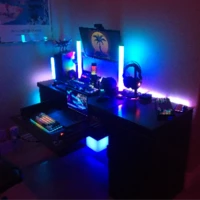
Insiders! This week's Thread of the Week is easy. Show me your awesome and amazing battlestations! All entries* will get the Battlestations achievement. If you already have it, you might get it again! And for those of you with some really impressive weapons of war, I'll be sure to drop some more Razer Silver your way. *You must upload a photo of your setup. If it looks sus I may not reward you. Make an attempt to look presentable. Achievements granted at my discretion. Be honest. Play fair. - - - About Razer Silver: Razer Silver is the only loyalty rewards credits backed by Razer. Earn Silver when you Pay with Razer or engage in software and services from Razer and our Partners. For more information on Razer Silver visit: https://gold.razer.com/silver/earn Need to Reload Gold?
Not sure how this happened, but after my new computer was created, i didnt plug in the mousepad and forgot untill now. (8/5/21)
What you see is a GPU heatsink and GPU board (heat source). In one of my GPU_TALK! thread, I have discussed it is important to get the correct thermal pad size and close the gap between the heat source and heat sink. Leaving a gap does not help with cooling down the heat from the GPU. Thermal conductivity of heat transfer will be incomplete. Other thing that can cause a gap, are GPU screws that is used to enclose the chassis. The important lesson is, you must align the screw holes properly before screwing in the screws. If the screw holes are not aligned properly, you might not be able to enclose the chassis. Miss-aligned screw holes and attempting to force the screws in; it will push the other side of the board, eventually creating a gap between the heat source and the heatsink. I noticed that my GPU heat sensor was at 87 degrees Celsius when I play games. I found this odd, since I just replaced both my thermal paste and thermal pad. I did recall, I was trying to force screw i
We hear stories the pre-applied thermal paste and thermal pad on GPUs are horrible. Horrible as in "quality" It sure is horrible~~~ The GPU you see above is my recently purchased new GIGABYTE GeForce RTX 2080 TI. Making custom changes like water cooling, thermal paste and pad can be risky, because your warranty on the card becomes nullified. So I ask, would you risk losing your GPU warranty to apply better thermal paste and pad on your GPU? Aftermath, the readings on GPU temperature against the clock work improved. Low temperature against fast clock work on GPU I am thinking a thermal paste and pad can cost about $40 - $60 USD (depending on the brand and its quality)
I've got a plan going for a new PC build that revolves around the Razer Tomahawk ITX case and the Raptor 27 144Hz monitor. I'm not into AAA titles or huge new releases, since I don't really have much time during the week to play games, especially not competitively, so I won't need much graphical power or any RTX type stuff for it, as the only game I own that would take advantage of anything that powerful is Borderlands 3. Anyways, here's the build I've been using for almost a year now: AMD Ryzen 5 3600X AMD Radeon Sapphire PULSE RX 5600 XT Corsair Vengeance LPX 16GB (2 x 8GB) DDR4 DRAM 3200MHz C16 Corsair RM 550x PSU ASUS TUF Gaming B550M-PLUS AMD AM4 motherboard w/ Wi-Fi 6 Corsair Force Series MP600 1TB Gen4 PCIe X4 NVMe M.2 SSD DIYPC DIY-F2-W White SPCC Micro ATX Mini Tower Computer Case (with WAY too many stickers!) (don't ask me what the case fans are, I don't even know, I just know there's two Noctua 120mm ones in it) and as for peripherals, Razer Kraken Tournament Edition Wired
As the title states I got to investigating my 5600 today and noticed next to my 8 pin PCIe there is a 4 pin header like the ones on your mobo I googled trying to findout what it could be used for but no luck can anyone give me some insight? Also if posted in wrong forum tell me which forum to move thread to.
Mine is practically garbage, because my pc does not run fortnite, pubg, valorant, cs go and much more good games the only game that runs with a lot of fps is roblox
Already have an account? Login
No account yet? Create an account
Enter your E-mail address. We'll send you an e-mail with instructions to reset your password.