





















[MONTHLY SILVER] July 2026 30,000 Silver Drawing
-
Recently active
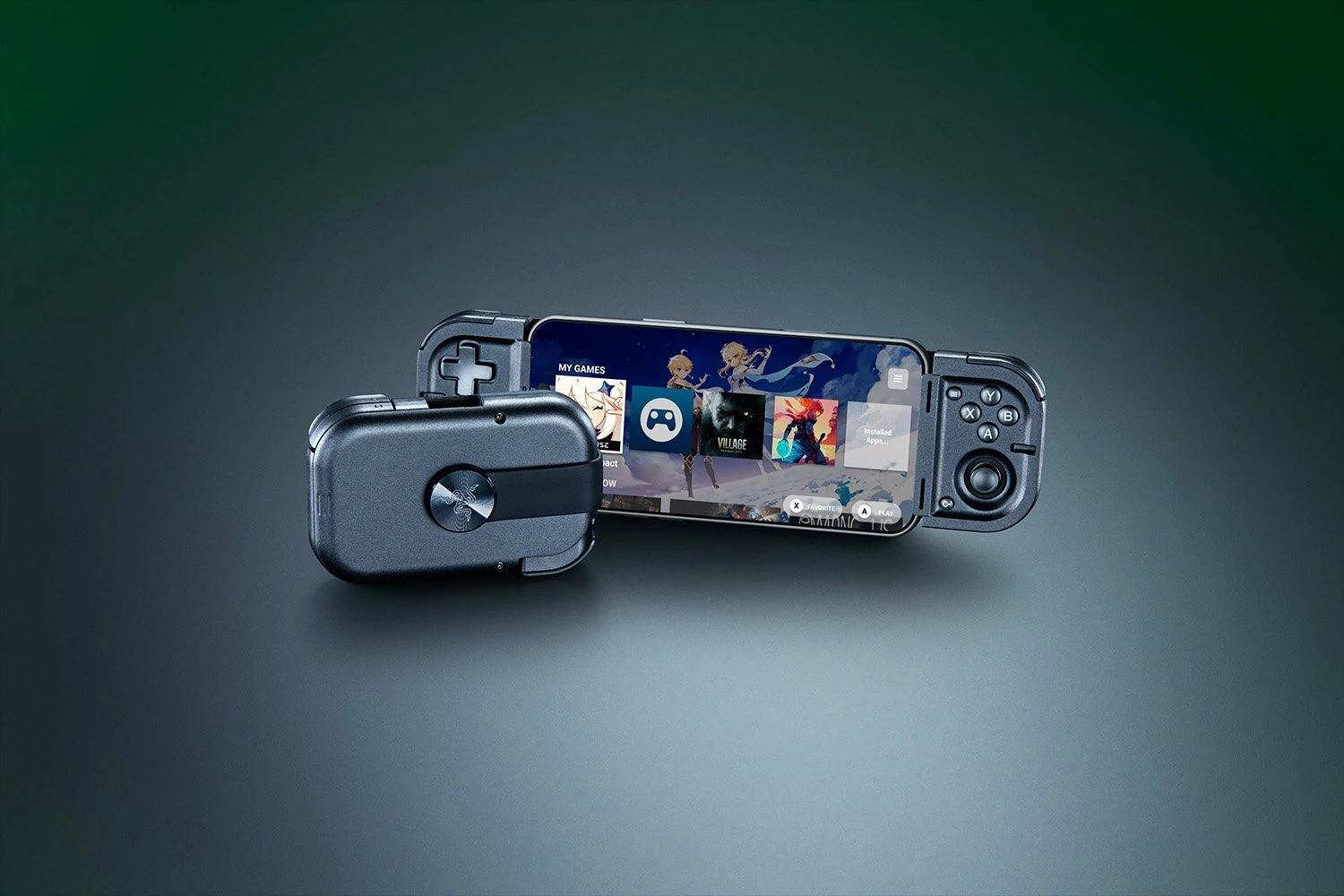
The Razer Edge is the Ultimate Android Gaming Handheld powered by the exclusive Snapdragon G3x. Built with an active-cooled gaming chipset and 144Hz AMOLED display, enjoy unbeatable gaming performance over long hours. Paired with the Razer Kishi V2 for console-grade control and precision, reserve a unit today: https://rzr.to/razer-edge
The Razer Edge is custom-built to be the ultimate Android gaming handheld. The exclusive Snapdragon G3x Gen 1 delivers unrivalled performance, the 144Hz AMOLED display offers incredible clarity at high speeds, and Kishi V2 Pro is a console-quality controller for compatible Android and Xbox games. What's Inside The Razer Edge? Wi-Fi Model Processor: Snapdragon G3x Gen 1 Gaming Platform OS: Android Display: 6.8″ FHD+ 2400×1080 AMOLED 144Hz Memory: 8GB LPDDR5 RAM Battery: 5000mAh Connectivity: Wi-Fi 6E Bluetooth 5.2 Weight: 264g tablet 401g tablet + controller Audio: 2-way speakers with 2 digital microphones THX Spatial Audio Storage: Internal: 128GB (UFS 3.1) External Memory Support: MicroSD (Up to 2TB) Dimensions: 260 x 85 x 11 mm Founders Edition Processor: Snapdragon G3x Gen 1 Gaming Platform OS: Android Display: 6.8″ FHD+ 2400×1080 AMOLED 144Hz Memory: 8GB LPDDR5 RAM Battery: 5000mAh Connectivity: Wi-Fi 6E Bluetooth 5.2 Weight: 264g tablet 401g tablet + control
Mobile Gaming Reimagined. Say hello to the Razer Kishi V2 for Android: http://rzr.to/kishi Take mobile gaming to new heights and play full PC and console games directly on your phone with the Razer Kishi V2. With cutting edge microswitch buttons, analog triggers, and programmable macros, you can now play games on your smartphone exactly as you would play them on a console, zero compromises.
Hello insiders! Lineage OS 19.1 based on Android 12 is now available for both RP1 and RP2! Hit the links below for your device and find the instructions to install and download RP1: https://t.co/nwzghVZ4dg RP2: https://t.co/n4qLBzrBOM
Defeat the heat with the new Razer Phone Cooler Chroma. Powered by advanced cooling technology and Razer Chroma RGB, you can now stay cool in the heat of battle with style. Available for iPhone and Android smartphones: Smartphone Cooling Fan - Razer Phone Cooler Chroma
This video will show you how to update the firmware of your Razer Kishi. Please note that any damages caused by upgrading or modifying your Razer product are not covered by Razer's Warranty Policy. For more information, see Razer's Warranty Policy. Visit the Support page: How to update the firmware of the Razer Kishi for Android - - - Insiders, what do you think the next Support video should be? Comment with a topic. Great suggestions will be rewarded with the repeatable "Nice" achievement. Also, for every 20 comments on this thread and the YouTube video, I'll be giving away a random "Great" Achievement. Insiders, be sure to leave your Insider ID in the YouTube comment to be eligible. Lastly, for those of you who subscribe to the Support channel, we'll be doing massive Silver giveaways for each milestone, so be sure to tell your friends, smash that like button and subscribe to the channel.
Protect your new iPhone while maximizing its performance with the new Razer Arctech and Arctech Pro - our 3rd-gen smartphone cases. Upgraded with extra ventilation channels and TPE-reinforced corners, itss time to give your phone the best-case scenario. https://rzr.to/arctech-pro
Make a pro-level move with the Razer Kishi for iPhone (Xbox) - a universal controller that is Designed for Xbox and MFi certified. Take on over 100 AAA titles through cloud-gaming on your phone with console-level tactility and precision. Pick one up now and enjoy a complimentary 90-day trial of Xbox Game Pass Ultimate. Limited time only and while promotion lasts: https://rzr.to/kishi
Stay frosty with the Razer Arctech Pro case for the Samsung Galaxy S21 Series. Lined with our unique Thermaphene Cooling Technology, the Razer Arctech case protects your device and dissipates the heat from the most demanding apps. Sign up to get notified when it ships here: https://www.razer.com/mobile-cases/razer-arctech-pro/
Mobile My Razer Phone is not charging How to check the IMEI number on the Razer Phone How to perform a hard reset on the Razer Phone Internet, PC, or Bluetooth connection issues on a Razer Phone How to perform a factory reset on the Razer Phone The fingerprint sensor on the Razer Phone is not working How to fix microphone issues on the Razer Phone How to clean Razer devices How to troubleshoot a Razer Phone when the camera does not work The fingerprint sensor on the Razer Phone is not working
I usually look for games that don't require a constant internet connection and are fun to play in short sessions. I'm interested in action, racing, and strategy games that still hold up today. What offline mobile games would you recommend, and what makes them worth playing?
I recently factory reset my Android phone and ran into the FRP (Factory Reset Protection) verification screen because I couldn't immediately access the original Google account. After successfully completing the verification later and setting the phone up again, I noticed that my Razer Kishi V2 no longer gets detected consistently when connected through USB-C.The controller sometimes powers on for a second but then disconnects, while other times it isn't recognized at all. I have already tested the Kishi V2 on another Android device where it works perfectly, so the controller itself doesn't appear to be faulty.I've also tried clearing the USB settings, enabling USB debugging, restarting the phone, updating Android, and reinstalling the Razer Nexus app, but the issue remains. The USB-C port charges the phone normally, which makes the problem even more confusing.Has anyone experienced a situation where an Android device behaves differently with USB accessories after going through the FRP
eamil change account
Is it just me or does this happen to anyone using the Razer V3 pro? Whenever I game using the V3 pro controller, it keeps disconnecting mid gameplay, I have tried several methods but it keeps doing the same thing. I use an iPhone 17 pro max and I’m beginning to think the cushion rubbers A are not really holding down the phone firmly as a little vibration will cause the controller connection to disconnect. I don’t play with a case on for fear of device overheating but using the phone case holds the device firmly but if I remove the case and try to play with the rubber cushion then I get the regular disconnections while gaming. does anyone also experience this? Or what else should I do?
Hi Razer support team. My razer viper ultimate model no: RC30-030501 is suddenly giving me issues, it keeps connecting and disconnecting. It seems to be an issue with the small dongle, as it works fine with the wired connection. What can I do to solve this issue and if I need to purchase a replacement dongle, where can I buy it? I am located in Canada. Thank you in advance
I’m needing to change my old number from my account , as I can no longer access it .
ถอนเงินคืน
Que es esto ?
Hey everyone, I’ve been using a Razer Blade 15 (i7, RTX 3060, 16GB RAM) for gaming, and overall it performs really well. But I’ve noticed that after about 30–40 minutes of playing games like Apex Legends or Warzone, the FPS starts dropping and the laptop gets noticeably hot.At the start, everything runs smooth on high settings, but performance dips as the session goes on. I’m wondering if this is thermal throttling or maybe something related to power settings or Razer Synapse profiles. Has anyone else experienced this on Razer laptops? Any tips to keep performance stable during longer sessions?
My account was suspended unexpectedly. I just tried to top up HKD 100 but couldn’t complete the payment. I attempted all methods to set up TFA (two‑factor authentication) but failed. My account got suspended when I tried to pay. I need urgent help to unsuspend my account and complete the payment.
use online controller tester, when i press the L3 button, dont have any respond.but the joystick use for moving is perfectly fine.can fix it?
I am writing to express my extreme disappointment with the Razer Kishi Ultra I recently purchased for a significant premium over competitors. Your marketing explicitly highlights this as a "God-Tier" controller designed for the iPad Mini that delivers a "true console experience without compromise."However, after spending hours troubleshooting, I’ve discovered that the flagship feature—Sensa HD Haptics—is completely non-functional on iPadOS. This is not a "console experience"; it is a silent, dead controller that costs twice as much as its competitors.Hiding a "not supported on iOS" disclaimer in a tiny footnote while using the iPad Mini as a primary marketing image is deceptive. I am requesting either a firm timeline for when haptic support will be added to the iOS Nexus app, or a full refund for this "compromised" product.
I’m experiencing some performance inconsistencies with my setup and would like advice from the community.My system sometimes shows minor lag or delayed response during gaming sessions, even though the hardware specifications should handle the workload smoothly.I’ve already tried: Updating drivers Checking background processes Adjusting power settings Restarting the system after updates However, the issue still appears intermittently.Has anyone faced similar performance behavior? I would appreciate suggestions on troubleshooting steps or configuration tweaks that could improve stability.
Hi,First, I want to say that Razer Nexus is the best launcher I’ve found on the Google Play Store. It really makes the Razer Kishi feel like I’m holding a Nintendo Switch, which is awesome.However, there’s one big issue: the “Owned Games” layout. The 1:1 square ratio doesn’t look good in handheld mode. When using the Kishi, the experience feels like a console, but the layout breaks that illusion.Why not use a 2:3 aspect ratio like Steam and other platforms? It would look much more like a real game library and feel more premium.Also, it would be amazing if we could: Customize game covers Upload our own cover art Remove games we don’t want displayed Customization would make the app feel much more personal and console-like.I really love the app, but improving the layout would make it perfect.Thank you!
Already have an account? Login
No account yet? Create an account
Enter your E-mail address. We'll send you an e-mail with instructions to reset your password.