Razer Blackshark V2 pro (2023) mic volume automatic turns down when talking. | Razer Insider
Skip to main content
Question

Razer Blackshark V2 pro (2023) mic volume automatic turns down when talking.

  • May 9, 2024
  • 20 replies
  • 7547 views

I just got the Razer Blackshark V2 pro (2023) and it’s great but when I speak into the microphone the mic volume automatically slowly turns down until my friends can’t hear me anymore. Then i have to manually put it up again so they can hear me, and repeat.

Is there a way to keep the mic vulome on 100% where it does not go down when i talk?

Please help, idk if i am just stupid or what? But i feel like i have tried everything.

20 Replies

FiszPL
Vanguard
Forum|alt.badge.img+1
  • VANGUARD
  • May 10, 2024

Do you have Volume normalization option turned on? If yes, turn it off, maybe it’s bugged somehow in Synapse.


  • Author
  • Insider Mini
  • May 10, 2024

I have tried both with it on and off it happens no matter what.


did you fix this? i am having the same issue


  • Author
  • Insider Mini
  • June 25, 2024

Nope i have tried everything even restarted my pc. Idk


Isabellinesidetech451

Yeah exactly, same thing is happening to me. I dont know if this is a dumb feature or what


I think I got it fixed but I haven't used it enough to make sure.

I went into sound settings → More sound settings → Recording → select the Blackshark → Advanced → (unclick) Allow applications to take exclusive control of this device.    

I haven't checked in in a FB call yet, but so far it seems to be working for Discord


just tried your way and it seems working! god bless you


I think I got it fixed but I haven't used it enough to make sure.

I went into sound settings → More sound settings → Recording → select the Blackshark → Advanced → (unclick) Allow applications to take exclusive control of this device.    

I haven't checked in in a FB call yet, but so far it seems to be working for Discord

Fixed problem for 1 day.. all same again


  • Insider Mini
  • November 11, 2024

hab genau das selbe Problem. Bevor ich dieses problem die nächsten monate mit mir trage hab ich mich dazu entschieden es diese Woche wieder zurück zu geben. Steige wohl doch um auf ein Shure Mic


  • January 4, 2025

I just got the Razer Blackshark V2 pro (2023) and it’s great but when I speak into the microphone the mic volume automatically slowly turns down until my friends can’t hear me anymore. Then i have to manually put it up again so they can hear me, and repeat.

Is there a way to keep the mic vulome on 100% where it does not go down when i talk?

Please help, idk if i am just stupid or what? But i feel like i have tried everything.

I have the same problem, did you fix it?


dataquickLemonChiffon464

Very same here! I bought this device for christmas and I'm making a fool of myself because I'm always being told that they can't hear me, even though I bragged to everyone about how great my voice would sound in the meetings because I have a headset with a professional microphone. But now, I have to use the built-in microphone of the notebook because it's more stable. It’s a shame! 


BayEraySter
  • Insider Mini
  • January 13, 2025

guys im having the same problem can you help me i tried every way in this page but they arent working


Born2BGod
  • Insider Mini
  • January 21, 2025

I think I got it fixed but I haven't used it enough to make sure.

I went into sound settings → More sound settings → Recording → select the Blackshark → Advanced → (unclick) Allow applications to take exclusive control of this device.    

I haven't checked in in a FB call yet, but so far it seems to be working for Discord

Fixed problem for 1 day.. all same again

After following the previous instructions, try right-clicking on the speaker icon in your Windows taskbar. Go to Sounds, then navigate to the Communications tab. Click on the "Do nothing" option and press Apply. I hope this might help resolve the issue.


Zerohout
  • Insider Mini
  • January 31, 2025

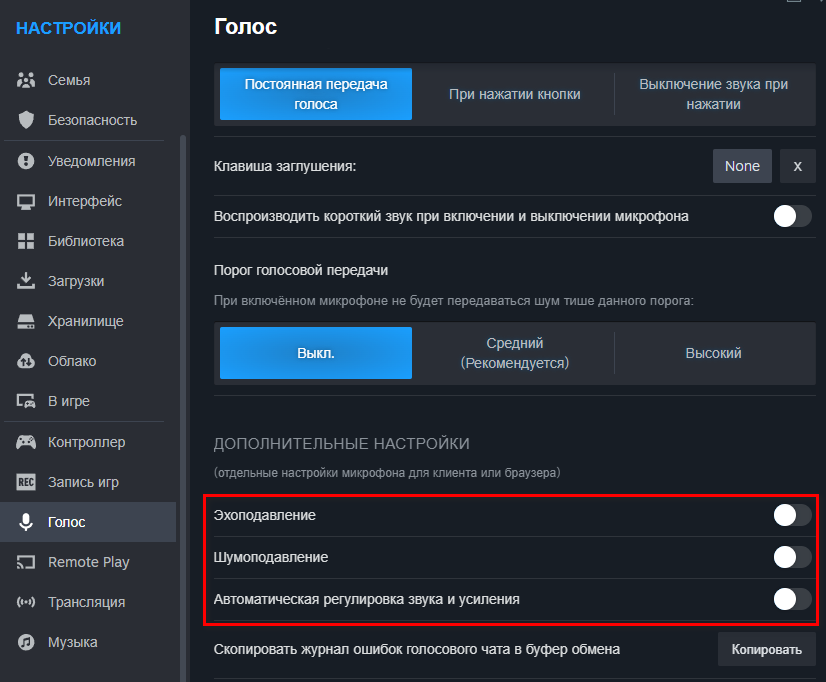
I ran into this problem and no advice helped me. However, there is 1 way that solved this problem.

It will only help if this problem occurred when Steam was running.

Go to Settings of Steam, Voice -> Advanced Settings -> Show -> Uncheck All. I'm sorry for the Russian screenshot, I think you'll figure it out)


  • Insider Mini
  • February 7, 2025

I figured out the issue. I tried every solution listed here and nothing worked. The issue is that the software will detect when you peak the mic by being too loud and lower volume automatically. Over time you’ll find your mic has nearly turned down all the way. Turn on voice gate and set it to 2 or higher (the higher the number the less your mic will pick up). If you set it to 1 it will continue to lower the volume automatically. This worked for me and I have not had issues after a day of playing games and screaming out of terror. I hope this helps everyone.


everplaceBlackShadows242

I figured out the issue. I tried every solution listed here and nothing worked. The issue is that the software will detect when you peak the mic by being too loud and lower volume automatically. Over time you’ll find your mic has nearly turned down all the way. Turn on voice gate and set it to 2 or higher (the higher the number the less your mic will pick up). If you set it to 1 it will continue to lower the volume automatically. This worked for me and I have not had issues after a day of playing games and screaming out of terror. I hope this helps everyone.

Well it helps somehow, but don’t fix the problem fully. My mic volume turns down, maybe not so fast. Idk, I see the solution only in buying new micro NOT razer, because I don’t think they will fix it some day


everplaceBlackShadows242

Well OK sry Razer, this is not your fault.
What I found:
    - Google chrome can auto adjust your micro volume level. You need to disable it. type chrome://flags in your address bar. Then search for "Allow WebRTC to adjust the input volume", and set it to "Disabled" (https://superuser.com/questions/1143778/how-do-i-stop-my-microphones-volume-from-automatically-decreasing-on-google-ha
    - After that, google chrome stops to adjust my micro volume, but Slack…. Slack still adjust it. I found that web version of slack can be useful in this situation (beacuse I disable micro adjustin in google chrome settings - https://www.reddit.com/r/Slack/comments/g5xxlv/please_stop_touching_my_microphone_settings/)

P. S. 
If you have problems with your micro volume, try to figure out which app does this shit and google it like “how to disable auto adjust microphone volume in SOME APP”.


Joes23123
  • Insider Mini
  • May 29, 2025

Well OK sry Razer, this is not your fault.
What I found:
    - Google chrome can auto adjust your micro volume level. You need to disable it. type chrome://flags in your address bar. Then search for "Allow WebRTC to adjust the input volume", and set it to "Disabled" (https://superuser.com/questions/1143778/how-do-i-stop-my-microphones-volume-from-automatically-decreasing-on-google-ha
    - After that, google chrome stops to adjust my micro volume, but Slack…. Slack still adjust it. I found that web version of slack can be useful in this situation (beacuse I disable micro adjustin in google chrome settings - https://www.reddit.com/r/Slack/comments/g5xxlv/please_stop_touching_my_microphone_settings/)

P. S. 
If you have problems with your micro volume, try to figure out which app does this shit and google it like “how to disable auto adjust microphone volume in SOME APP”.

 
This didnt work, its probably somthing to do with razor as ive just fully wiped my pc, redownloaded only the basics and now its happening.


  • Insider Mini
  • July 23, 2025

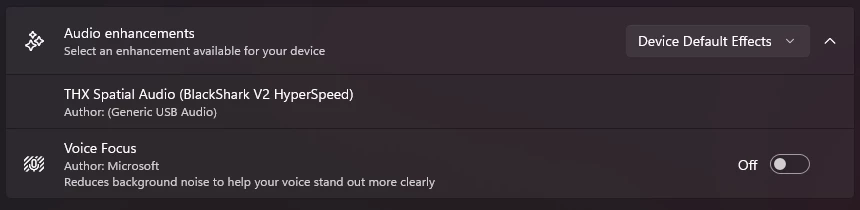
Go to Settings > System > Sound > Microphone and set Audio enhancements as Off from Device Default Effects.


  • Insider Mini
  • September 21, 2025

Hey everyone,

I've developed a permanent solution for the Razer microphone volume issue that many of us have been experiencing. This will especially help Razer Blackshark V2 Pro (2023) series headset users who are tired of constantly readjusting their microphone levels.

🔧 What's the Problem?

  • Microphone volume randomly drops (usually to 50%)
  • Need to manually readjust after every application launch
  • Windows audio settings keep resetting

✅ Solution: Razer Mic Volume Fixer This application I developed:

  • ⚡ Runs in background and automatically maintains your microphone level
  • 🎯 Targets only Razer devices (doesn't interfere with other hardware)
  • 🌍 Supports 10 languages (including English)
  • 💾 Lightweight and fast (under 10MB)
  • 🔒 Open source and secure

📥 Download: GitHub: https://github.com/Bpolat0/razer-mic-fix 
Direct Download: Get RazerMicFixer.exe from the Releases page

🚀 How to Use:

  1. Download and run the executable
  2. Set your desired microphone level
  3. Leave the app running in system tray
  4. Your volume will now be automatically maintained!

🛡️ Security:

  • Completely open source
  • Clean virus scan
  • Only accesses audio devices
  • No data collection whatsoever

I believe this will be helpful for all Razer users experiencing this issue. Have you tested it? I'm looking forward to your feedback!

Note: Developed for Windows 10/11. If your antivirus shows a warning, this is normal (unsigned executable). If you have security concerns, you can review the source code on GitHub.

#Razer #Microphone #Solution #OpenSource #Gaming