














[MONTHLY SILVER] July 2026 30,000 Silver Drawing
-
Recently active
Hi, I have a 2 year old Razer Blade 14 2021 edition and it's heating up quite fast now. I read online that laptops more than 2 years are recommended to re apply thermal paste. Can anyone recommend a good rb14 thermal paste? What's the sizes as well for the thermal pads?
Hi, my Razer 17 2022 goes to sleep after closing the lid even tho I have set it to "do nothing" in system settings when I close the lid.How can I get it to not sleep when i close the lid?I am asking cause I am buying an projector and i want to be able to close to lid of the laptop to watch in full dark.Hope to get some advice. Thanks
hi, where do i check if the blade 14 with gtx 4070 and 32gb ram is available for purchase? or is there such a variant even? thanks.
Yesterday I bought a used 2016 12.5 Inch Razer Blade Stealth, I wiped it using a windows 10 usb drive, now whenever i try to use one of the newer drivers, it says, this driver is only for the blade stealth, and it wont show my serial number in system information, please help me, and i cant see my sku
Hi all, just got my razer 17 back from RMA repair. Runs very fine, but no paradise without a snake: the battery does not work! When I try to figure out what is the problem, I get BSOD. Hope support will be as quick about a repair as lasr weekPlease …great day to allGert
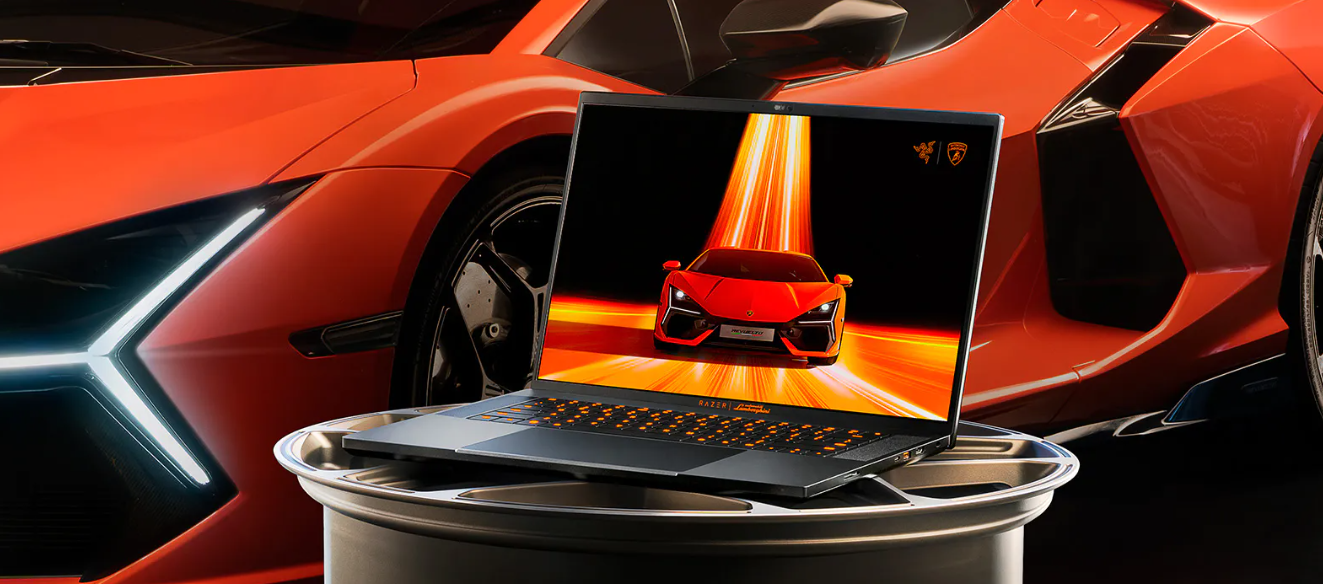
Design. Performance. Reimagined. Meet the new Razer Blade 16 x Automobili Lamborghini Edition: https://rzr.to/blade-lamborghiniFeaturing an NVIDIA GeForce RTX 4090 GPU and 13th Gen Intel Core i9 HX Processor, experience high-octane performance housed in a custom CNC-milled chassis. With only 150 models available worldwide, be among the select few to own this supercar-inspired gaming laptop.
Hello, Razer support, please help me. I just topped up my Razer gold. And I need an OTP for my phone number, but the phone number I listed is one that I haven't used for a long time. Can I change it again? With a new number? Please help and cooperate. I have done the steps listed on Razer support but have not found a solution that allows me to change my old phone number to a new phone number.
Hello,I am thinking of investing in a stylus to acompany me in my studies.Can I use an Active Stylus pen (e.g. ASUS Pen SA201H, or any Universal PRECISE stylus that can connect to my blade) with my Razer Blade Advanced model 15" (2021) rz09-0409 (UHD touch screen)?I have searched a bit into it but cannot stumble upon anything informative.Thanks, have a great day.
This is my personal experience and im not a professional. This is for people who want to lower the temperature but keep good performance Since i got the razer blade 14 about a year ago, i’ve had a great experience using the laptop. Although the screen is a bit small for hours of work. This laptop is super powerful to the point where i dont see any difference in performance compared to my main desktop computer. The only issue that comes up is high cpu temperatures while playing pretty much any game. The way i fixed this issue for myself is as follows: Lower the screen resolution for all games to 1920x 1080 (no noticeable change in quality) and set fps limit to 60. With 4k res u get higher sharpness but its really intense on laptop. You can set higher fps on competitive games. But dont set it to unlimited. Nobody needs 400 fps. 2. Manually setting fan speed (depending on the task) using razer synapse 3. Using Ryzen controller to limit the CPU temp to 70 (what this does from wha
Does my Razer, RZ09-03009 support an SSD (M.2 NVMe PCIe 3.0 x4)?
My laptop fans seem to spin wildly all the time; some days, they get so loud it almost sounds like a jumbo jet flying past.These are my performance settings, which I use because I primarily rely on this laptop for Architecture (mainly Revit Architecture), and at times I have TWINMOTION running as well. I understand that when both of these applications are open, the laptop needs the extra fan speed to keep the system cool. However, I’ve noticed that even when I’m just browsing the web, the fans still spin loudly for no apparent reason.
Whenever I use Razer 7.1 Surround, I get an installation error. So installation is not possible. I am using Windows 10 and RAZER BARRACUDA X (PLUS). Since last year, the program installation has been canceled with error code 121. I would very much like to use 7.1 surround. Please tell me how to fix this error.
Anyone able to upgrades your razer blade with Intel BE200 wifi7 card ?Window System able to detect the card , but it not work….Still not work no matter i installed the official drivers on inter ( my ver. 23.60.1 ) Intel® Wireless Wi-Fi Drivers for Windows® 10 and Windows 11*After seach on internet also no help , so i try to re-installer the org wifi 6E card but it is not working too, not matter i reset the PC….. does any one have solution i can fix it ...Device PCI\VEN_8086&DEV_272B&SUBSYS_00F08086&REV_1A\4&1ca58bc7&0&00E9 had a problem starting.Driver Name: oem172.infClass Guid: {4d36e972-e325-11ce-bfc1-08002be10318}Service: Netwaw16Lower Filters: Upper Filters: Problem: 0x0Problem Status: 0xC00000E5
Can anyone help me how to change my old number I can't access it anymore. My email is working but it will not send there the code please help me
i have a kraken razer pro v2 and i downloaded synapse to turn my microphone up on discord but it wont connect i don't know if its because of this cord divider i have that slots into my pc’s mic jack and headphone jack i also just tried connecting it straight to my pc but it still wont connect and i tried to click on compatible devices but it wont let me see it saying that i don't have access when i am the only one on my account please somebody let me know if they have an answer
I have Razer Blade Stealth 13 (2019), in specifications there should be combo audio jack but when I connect my headset with combo jack the microphone from the headset doesn´t work it isn´t even recognized by windows. I tried 3 headsets, all the same. In audio setting there is only the integrated microphone and nothing else (exept Stereo mix), there is nothing else disabled or unplugged. Is this some kind of bug or is it damaged audio jack?
DESPERATE TIMES CALLS FOR DESPERATE QUESTIONS. As most of you my know Forever winter is out now (Not fully) It's a great game thats early release and it's still (aparrently) alpha! Game play and connection seems pretty damn good to me though! I was wondering if my 15'6 Razer blade 1TB RTX 2080 can run it or it's the game guvung ne the lag spikes?
Razer should make stuff for custom liquid cooling. would be sick
I have a Book 13 - RZ09-0357 on windows 11, after performing the latest windows updates I am unable to use my built in wifi card (Intel AX201) as the it reports it cannot start under device manager (Code 10 the requested operation was unsuccessful) I have tried completely uninstalling the driver and reinstalling, running the latest razer/intel driver updaters, changing the device power settings to high performance, all to no avail. any suggestions would be appreciated.
Well, having tried and returned two 2023 Razer Blade 16 Mini-LED models (one with RTX 4080 and another with RTX 4090) over various display issues I crossed my fingers and bought a 2024 Razer Blade 16 mini-LED with the RTX 4090 and am very happy with the display. The single dimming option yields spectacular results for standard use and the multi-dimming zone selection is equally spectacular for gaming and watching movies. Though I am not aware of any audio changes to the 2024 model, I would swear the audio is better as well. I also have the impression the fans are producing a higher quality, lower decibel sound.My only small critique on the display is that the single dimming zone control (i.e. ‘LOCAL DIMMING’) is not part of a ‘profile.’ As a result, unlike other settings in Razer Synapse I can link to the launch of games, I have to manually toggle local dimming on or off. I assume that is just a bug they will fix.While I need to do more performance testing (so far so good) and do
I have a Razer Blade 17 Gaming Laptop, Intel Core i7-11800H, 32GB RAM, 1TB NVMe. It came with an M2 ssd which contained the operating system (Windows 10, updated to 11).Some time ago I added a second M2 ssd into the spare slot. This was used for documents. Every so often the second drive ‘vanishes’. I can usually get it back by going into the bios and reconfiguring the NVME with F3 ‘optimized defaults’.Last week I decided to install a second OS (Windows 11) on this second drive. Already I’ve had two boot problems as the drive couldn’t be found.Is there any way to ’cure’ this? Derek Clements
Install this Firmware Update program on Razer Blade 16(RZ09-0510STM4-R3T1)RazerUpdater_v1.1.1.3_S10_BOE_0B90_v4.2.exeAfter the installation only shows a progress, then there is no response.Does anyone have the same problem?Any suggestions?
just wonder what are some of ur fav products to use and best benefits, would u recomend?
Like many other RB15 owners, I love my laptop but find its battery life to be horrible with but some minor tweaking and adjustments you can improve your RB15’s battery life. Going through forum posts and YouTube guides, I have compiled a list of things you can do to improve your RB15's battery life and even reduce temperatures.Be warned you WILL sacrifice some performance and even experience things differently than I do, but from my experience, the performance loss is negligible.I tested this on my Razer Blade 15 Base 2020 (RZ09-0328) with the RTX 2060 and the Intel i7-10750H, Because of this I will not include an undervolting guide since the CPU is locked from undervolting it previously could be undervolted if you have the BIOS version 1.01 but any versions after that will have undervolting locked. Whenever using the RB15 on battery or any laptop for that matter always have it on Half Brightness, No RGB with Battery Saver On this will significantly improve your battery life. You may
When can I order the blade 15 2023?
Already have an account? Login
No account yet? Create an account
Enter your E-mail address. We'll send you an e-mail with instructions to reset your password.