













[MONTHLY SILVER] July 2026 30,000 Silver Drawing
-
Recently active
Hi, I have aquired a defective Razer Blade 15 Base 2020 laptop with a DA550-MB MP V4.0 motherboard, which has two missing MOSFET's (I have attached an image, missing MOSFET's are marked with a red square). The problem is that I cannot find high-res images for this board, and I cannot figure out what the marking is on the missing MOSFETs. I would be eternally grateful if somebody could send me either a close-up image of the area, or send me the markings on the MOSFET's. Thank you very much in advance for your help. Best Regards, sect-sin
I recently bought myself a Razer Blade 14 2022, with a RTX 3070ti. Before this I had Asus Rog Zephyrus g14, (2022 model).I really like the following Asus feature: depending on whether the laptop is connected to power, the screen refresh rate changes. Razer does not have such a feature, which, in my opinion, is very, very bad.This modification for Synapse was already discussed earlier on the forum (Synapse 3 - Change refresh rate based on power source??? | Razer Insider), but, alas, it is only available for 2023 models (this is unfair!)So I tried to take matters into my own hands and wrote a program that automatically detects whether the laptop is connected to power and, depending on this, changes the screen refresh rate. For now, frequencies of 60 Hz and 165 Hz are supported (this is hardcoded, but if someone uses this, we can discuss how to create a certain config). Download link: https://github.com/anatolkavassermann/refreshRateChanger.How to set up the program:install .Net 6.0; down
Hey, everybody. I have faced with a problem. I have a lot of devices from razer, but on PC there are not so many usb ports. I bought standard hubs but for some reason razer devices with such things do not work well.Maybe you can suggest a good hub that will support razer chrome and work with all devices?
A couple of years ago, UK models which had per key RGB did not light up the secondary key functions. Is this still the case in 2023?
I recharged money but when I used Razer to pay, I couldn’t receive the verification code anyway. I’ve been trying for 4 days and it said it was sent but never received. The input of the backup verification code also showed an error.
คือผมเข้าทางเฟสแล้วมันให้ยืนยันสองชั้นผ่านจีเมลในเฟสแต่เมลเฟสใช้ไม่ได้แล้วต้องทำไง
my laptop screen stop working a few days ago can someone help me how to fix it
Sorry for my bad English, but is something that I don’t know. When it’s going to be available in Spain. The blade 15, 16 and the blade 18 are already out.Does anyone know when? And if you have any type of information post it pls. Thanks.
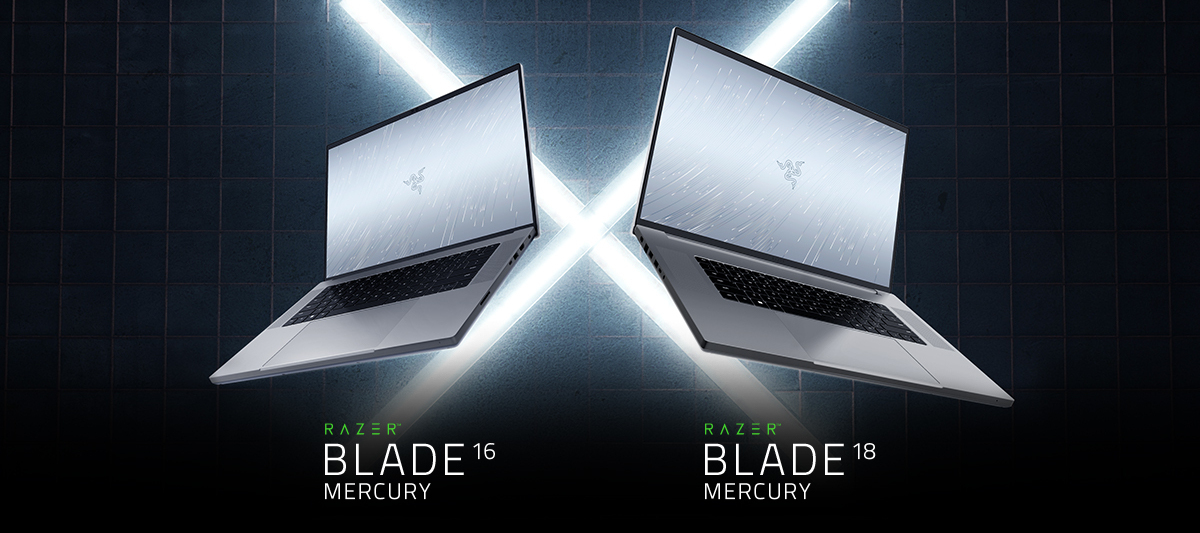
All new colorway, same insane performance. Meet the new Razer Blade 16 and 18 Mercury Editions. Featuring NVIDIA GeForce RTX 40 Series graphics and Intel 13th Gen Core i9 HX processors, power has never looked this pure: https://rzr.to/blade-laptops
Hi all, I have a question. My Blade 17 comes with 280W charger, since it connected behind my desk, I thought that I will buy second power brick for travel. I have bought in Razer online store 230W charger. When I’m connecting it to my Razer, I got this info:My question is if I can use my Razer with 230w charger or I will damage my Blade and/or battery in my Blade?
I have a Blade 16 4080 and a Blade 16 4090. The 4080 has Advanced Optimus. The 4090 doesn't have Advanced Optimus (or maybe it's disabled in Bios). Does anyone know if they disabled Advanced Optimus on the 4090s for some reason? Or if it has to be enabled in Bios, what is it referred to in the Bios options? *Edit* disregard. I found and enabled it in Bios.
I want to install 7.1 surround sound but my computer detects it as speaker so i cant select the output device. does anyone know how i can select it as a headset?
Do you remember the Razer Edge gaming handheld for Android, and what are your thoughts on it? Also, what's your opinion on the Steam Deck, which shares a similar concept of a portable gaming device for PC gaming?
I just received a “new” blade 16 as a replacement to my last one. My last blade 16 ran up to 107c. My “replacement” hit 104c after about 20 minutes of gaming. It doesn’t seem Razer has an actual fix. They were concerned enough to replace my blade, but then replaced it with a new blade with the same problem.Can Razer solve the heat issue or do I have to take matters into my own hands?Does your blade 16 heat up in the same way? Note: I elevate the back of the laptop, fans run on full. CPU is on boost to enable fans to run on high, and gpu is on high.If I have to back off performance because factory cooling can’t cool the laptop, i’m not sure the purpose of this laptop.
I wasn’t undervolting today, but I just received a new cpu cooler this afternoon and wanted to see the possibilities. I installed the bios released yesterday when Synapse notified me. I’m dumb and didn’t read bios notes.I couldn’t find undervolting options in synapse and then checked the notes and razer took away undervolting.Anyone know why? It doesn’t look like I can get and downgrade to an earlier bios so I guess i’m stuck.My temps are pretty toasty and I was hoping the fan/undervolting mix would help. Bummer.Here’s my current temps with max settings, and a laptop cooling fan on max. averages are ok, but those spikes…..
Click on start and type the word “power” and “Choose a power plan” will appear, however, only the Balanced plan is visible.Click on Start then settings, power & battery, there are more options including best performance.Viewing CPU performance in HWinfo, the cpu likes to throttle down to 798mhz. This looks to me the cpu is following the “Balanced” plan and not the performance plan.I’m wondering which one is really controlling the power scheme.Anyone know?
Hi, yesterday i noticed something while i was playing fortnite on my razer blade 15(rz09-0328) 2020 base model i noticed that the icon in windows that shows that the device is charging was going on and off, it kept going until i closed fortnite, so i found out that when the power is underload it was doing this, then i shut off my laptop and listened to the transformer inside of the adapter it was stable but when i but it under load it was pulsing 0.7 second in between. so i did these :*checked for overheating which was normal on epic setting on fortnite : gpu 77,cpu 83*unpluged all usb’s, hdmi port extenal hdd etc. the moved to a diffrent place with a diffrent socket *tried to update all things but nothing came up*i read this but nothing helped me no EC update for the base model *trying to position the plugs/cables good so i made sure that no port was not in place/loose im sick of it, it only happens when im putting it under load all my cables where rated to 10A 210-240Vi have the plu
i have been looking all over for an answer, and this site and reddit are the only 2 places i did not look. i have a HP EliteBook 745 G5 and i never had a laptop with a type-C port. from what i can tell on my research is that the type-C port on the side is a DP port (Alt mode). but before i go spending money on an Razer core or any eGPU, i wanna find out if my laptop can support them first. is my laptop compatable with an eGPU, or does it NEED to be a thunderbolt port to support it?
YES I BUY A CONTROL THE LAST YEAR AND IT DOESNT FUNCTION ANYMORE AND RAZER DOESNT WANT TO HELP ME, CAN SOMEONE PLS TELL ME HOW TO CONTACT OFFICIAL RAZER TO HELP ME WITH THIS?? I HAVE PURCHASED MORE THAN 5 PRODUCTS ON RAZER AN ANYTHING HAPPEND ME LIKE THIS, JUST NEED HELP PLS
I have late model Blade 15 (2020 late model (RZ09-03519)). I am trying to find out about the camera in the laptop. Seems like it should be compatible but windows is saying something different about it.Anyone have experience with it? Thoughts (other than saying buy usb compatible camera)?Have looked for driver updates but not seeing anything.
Looking to finally upgrade to a proper modern laptop but having to use preinstalled win11 is a dealbreaker for me.Call me old fashioned or whatever but I’m wondering if it’d be possible to downgrade to 10 on a 2023 blade?I did some research but there isn’t really a good answer out there, apparently it can cause some issues. Just trying to see if anyone here has more info.Thanks!
Hello Razer teamMy system is blade 16 with 4090.Yesterday,I foolishly updated my BIOS to a new version that enforces undervolt protection.I am someone who values device noise and aesthetics, which is why I chose Razer. Previously, I used Intel XTU to undervolt and had a great experience with it. However, the new BIOS has ruined everything.I implore you, can you please release a BIOS update that gives me the option to undervolt? This is extremely important to me.
Hi Razer communityI have a blade 16 with the 4090 and it’s been as hot as 107c on the package, but that is the heat spiking. Depending on how I prep it, the average temps will range from 84-95c.I always elevate it with my Razer stand and I’ve under volt with -125.I always run the fans on full.Razer support has offered to “service” my laptop and even replace it. But i’m hesitating because i’m not sure a service or replacement will be better, temp wise.My question is, will a different blade 16 be any different? They all seem to run very hot if you choose cpu boost/gpu high, no matter what. even with the settings above, low/low still spikes up to 98c. While the spikes are high, should we just focus on the averages and ignore the spikes? I’ve never seen some official guidance from Razer on average temps vs spike temps and what range is normal and what range warrants a service or replacement.
Laptop blade 15 stopped booting up. charger looks fine but the blade`s LED indicator is not lit up. i try to hold the power button down and after 10 seconds the indicator blinks in white once.
HelloI have Razer Tomahawk mini itx chassis and aorus b760i elite motherboard. So front logo doesn't turn off when ErP in BIOS is disabled, and it turns off when enabled but I cant charge stuff when PC is off. I've noticed on YouTube that not everyone has the same problem especially msi unify motherboard builds. Is there any thoughts about it? Is it true that some builds doesn't need ErP enabled? Please answer me if you have an information
Already have an account? Login
No account yet? Create an account
Enter your E-mail address. We'll send you an e-mail with instructions to reset your password.